How to track your Google ranking (and what the numbers actually mean)
Your position on Google is not one number. It changes with location, device and time, so a single manual search tells you almost nothing. Here is how to track it properly.
Key takeaways
- Your ranking is not one number - it changes with the keyword, place, device and date.
- Google Search Console is the most reliable free source: real impressions, clicks and average position from Google itself, covering 16 months.
- A manual search lies: use a private window, sign out, and remember that AI Overviews and the map pack push organic results down.
- Free rank checkers are good for one-off and competitor spot checks, but they keep no history.
- A paid tracker earns its money when you need scheduled checks from a set location with history - turning 'position 7' into a trend.
- Track clicks, impressions, average position and CTR - and check weekly in four-week blocks, not daily.

By Shamim, founder of Serpastra
Updated , 9 min read

Most business owners check their Google ranking the same way: they type a keyword into Google, scroll, and look for their own site. If it shows up, they relax. If it does not, they panic. Both reactions are usually wrong.
Your position changes with the searcher's location, device, search history, time of day, and which features Google shows above the organic results. A single manual search tells you what one person saw once: nothing about the trend, nothing about how many people found you, and nothing about whether the ranking brings in customers. Tracking rankings properly means fixing the settings, recording the numbers the same way every time, and reading them alongside clicks and leads. This guide shows you how, with free tools first, when a paid tracker is worth it, and what each number actually means.
Why your ranking is not one number
Every ranking has five settings behind it, and the number means little until all five are fixed. The keyword is the exact wording someone typed. "Dentist near me" and "best dentist in Dallas" are different searches with different results. The place matters just as much: Google shows different results for the same query in different cities, and for local searches it can change results street by street. The device matters too, because mobile and desktop results often differ.
The date matters because results move daily. A page can sit at position 6 on Monday and position 9 on Thursday without anything changing on your site. And the URL matters: when a different page on your site takes over a keyword, the position number alone hides the change. You might still rank at position 4, but for a blog post instead of the service page that converts visitors into calls.
Check your ranking free with Google Search Console
For your own site, Google Search Console is the most reliable free source of ranking data, because the numbers come straight from Google. It shows the average position of your pages for every query that produced an impression, over a date range you choose. The data covers the last 16 months and updates daily, with a lag of about two to three days.
- Open Google Search Console and select your verified property. If your site is not verified yet, do that first: it is free and takes a few minutes.
- Go to Performance, then Search results. Make sure the search type is set to Web.
- Tick the Average position box at the top, alongside Clicks, Impressions and CTR.
- Open the Queries tab to see the average position for each search term, or the Pages tab to see positions per URL.
- Click a query, then the Pages tab, to see which of your pages ranks for it.
- Set the date range to the last 28 days for a current view, or compare two periods to see movement.
Two things to know before you trust the numbers. First, Search Console only shows queries that produced impressions, so it will not tell you where you rank for keywords you do not rank for yet. Second, very low-volume queries are grouped as anonymised, so you will not see every search term. For a local business, the Queries tab is still where the real story lives: sort by impressions and check whether the page ranking for each term is the page you want customers to land on.
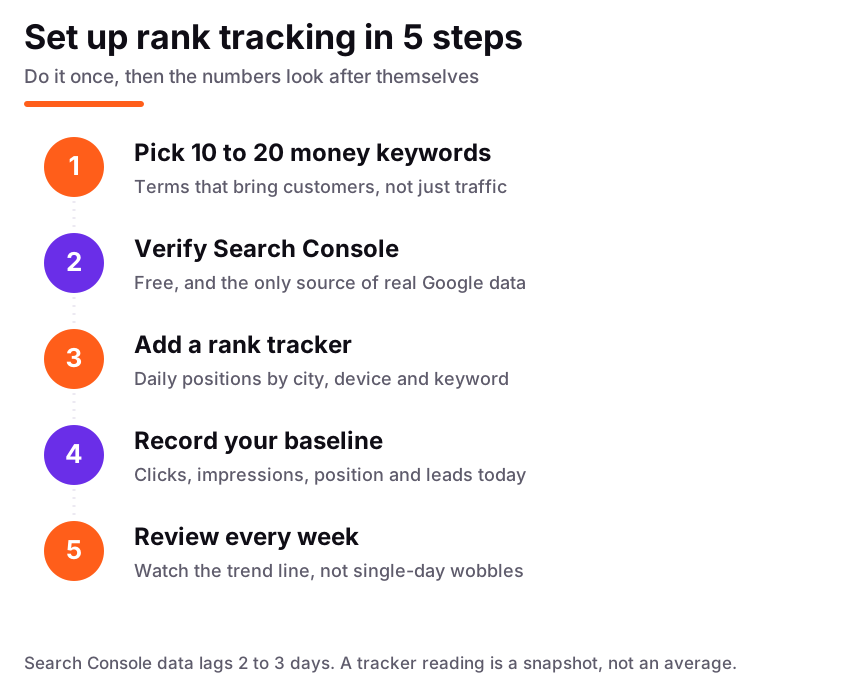
Set tracking up once, properly, and the weekly review takes minutes.
Not sure where to start?
Get a free audit - written findings in 2 business days, yours to keep.
Get my free auditThe quick manual check, and why it lies to you
Sometimes you just want a fast answer: where do I rank for this keyword right now? A manual search can give you a rough read, but only if you remove as much personalisation as possible. Open a private or incognito window, sign out of your Google account, and search the exact keyword. Scroll past the ads and note where your page appears among the organic results, and what sits above it: AI Overviews, a map pack, or shopping results all push organic listings down the page.
Free rank checkers worth using
Free checkers answer a question Search Console cannot: where does any site rank for a keyword, including a competitor's? They run a live search from a set location and report the position. Useful for one-off and competitor spot checks, and for keywords you do not rank for yet. They are not a tracking system, because they keep no history.
Ahrefs Webmaster Tools is free for sites you verify, and it shows rankings and backlinks for your own site. SERPROBOT and similar free checkers let you test a few keywords at a time for any domain without an account. Semrush offers a free account with a small daily limit, though its position tracking is paid. Free limits change often, so check each provider's current plan. For a fuller comparison of the paid options, see our guide to the best rank tracking tools for 2026.
When a paid rank tracker earns its money
A rank tracker checks the same keywords on a schedule, from a set location and device, and stores the results so you can see a clean line over time. That history is the whole point: it turns "we rank at position 7" into "we moved from 14 to 7 in six weeks after the service page rewrite". The main options are the tracking tools inside Semrush and Ahrefs, plus dedicated trackers such as SE Ranking, AccuRanker, Wincher and Mangools SERPWatcher. They differ in update frequency, how precisely they target a city, and how many keywords each plan covers.
For most local businesses, a tracker earns its money once you track more than about twenty keywords, need positions by city rather than by country, or need to watch competitors side by side. Below that, Search Console plus a free checker is usually enough. If you hire an SEO provider, ask which tracker they use and how often it updates. A tracker reading is a snapshot: if it disagrees with Search Console by a few positions, that is normal, not a sign that either tool is broken.
What average position actually means
Average position is the most misunderstood number in Search Console. In the chart at the top of the Performance report, it is the average of your topmost result across the whole site. In the Queries or Pages table, it is the average for that specific query or page. A query that showed your site at position 2 for half its searches and position 12 for the other half reports an average of 7, even though you were never actually at position 7.
It is also affected by things that have nothing to do with your SEO. Google stopped serving 100 results on one page in September 2025, and that change alone shifted average positions for many sites. Averages can also improve when a query gains impressions in a place where you rank well, even if nothing changed on your site. So read average position as a direction, not a precise score. A steady move from 14 to 8 over two months is real progress. A wobble from 6.2 to 7.1 in one week is noise.
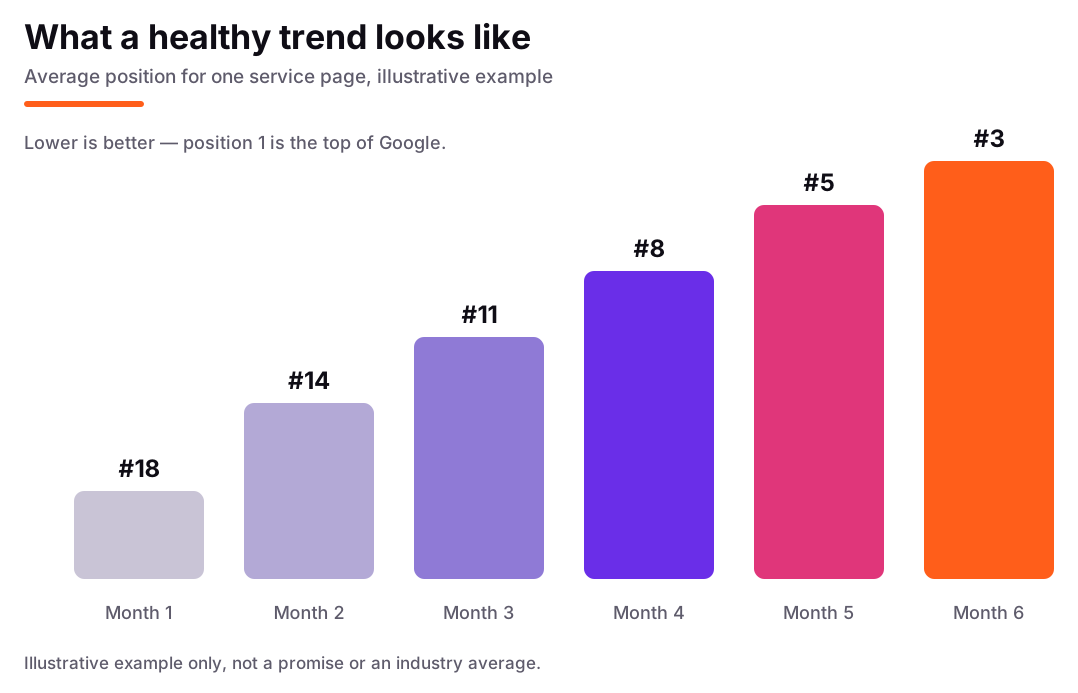
A healthy trend is a slow, steady climb. Flat weeks are normal; a sharp drop is worth investigating.
The four numbers that matter more than position
Position is the number everyone asks about, but it is not the number that pays the bills. Four others tell you whether the ranking is working.
Clicks. How many people actually visited from search. A page at position 3 with a weak title can get fewer clicks than a page at position 5 with a clear one. If impressions rise but clicks stay flat, the problem is usually the title and description, not the ranking.
Impressions. How often your pages appeared in results. Rising impressions mean Google is showing you for more searches, usually the first sign that new content is being picked up. Falling impressions can mean a page lost visibility, or that a seasonal query faded.
Click-through rate (CTR). Clicks divided by impressions. A low CTR on a high-ranking page is fixable: rewrite the title to match the search intent, add the city or service detail people look for, and make the description answer the question instead of repeating the title.
Leads. Calls, form fills, bookings and direction requests. This is the only number that connects SEO to revenue. Set up call and form tracking in Analytics so you can see which pages produce enquiries, not just visits. A keyword that brings ten visits and two calls beats one that brings a hundred visits and none. Our guide to how long SEO takes to rank explains why leads lag behind rankings by weeks or months, and why that lag is normal.
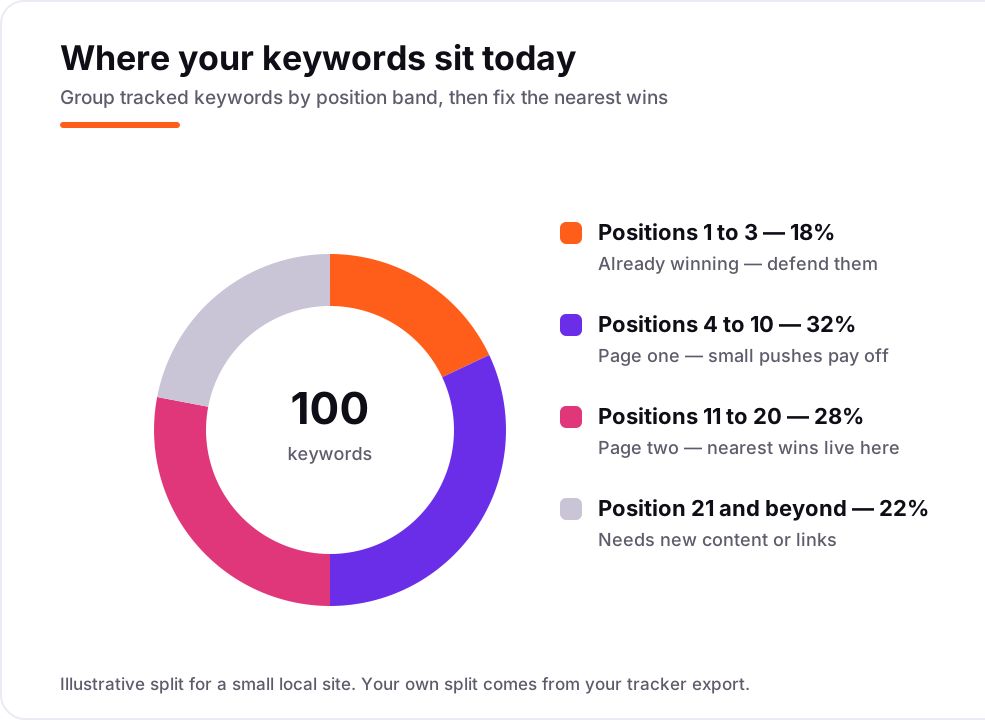
Sort keywords by position band. The nearest wins are usually the ones sitting at positions 11 to 20.
How often to check, and how to read a drop
Weekly is enough for most local businesses. Daily checks mainly show normal fluctuation, and they tempt you into reacting to noise: rewriting a page because it slipped two places on a Tuesday. Check once a week, on the same day, and compare four-week blocks rather than single days.
When a position does drop, work through the causes in order. First, check whether it is a real drop: compare the same period in Search Console and check whether a different page on your site took the ranking. Second, look for a site change: a page edited, redirected, or accidentally set to noindex. Third, look at the results themselves: a new AI Overview, a new competitor page, or a map pack appearing above the organic results can push you down the page without changing your actual ranking. Fourth, check for a technical problem, such as a page that stopped loading properly on mobile. Only after those checks should you change the page itself. Most drops are one of the first three causes, and editing a good page in a panic is how businesses make a small dip permanent.
Tracking local rankings and the map pack
Local rankings need an extra setting: the searcher's location. A dentist ranking first in their own neighbourhood can be invisible three miles away, because Google weights distance heavily. So track local keywords with a location set to each area you serve, not just your own city centre. Most paid trackers let you set a city or postcode; free checkers usually only allow a country, which is not precise enough for local work.
Track the map pack separately from organic rankings. The map pack is the box of three businesses with a map, and it runs on different signals: relevance, distance and prominence, with your Google Business Profile doing much of the work. Record your map pack position for your main keywords each week, alongside your organic position. Our guide to how to rank in the Google map pack covers the steps, and our Google Business Profile checklist is the field-by-field version. Reviews matter too: Google reviews help local SEO directly, and a steady flow of recent reviews is one of the few ranking signals you can improve every week.
A simple weekly routine
Put the whole system into a routine that takes about twenty minutes a week. On the same day each week, open Search Console and note clicks, impressions, average position and CTR for the last 28 days, then compare with the previous 28 days. Open your tracker and note the position of your ten to twenty money keywords, grouped by band: winning (1 to 3), page one (4 to 10), near wins (11 to 20), and everything else. Check your map pack position for your three most important local keywords. Then write down one line: what moved, and why you think it moved.
That one line is the habit that matters. Over a month it becomes a record of what actually works for your site. And when a page sits at positions 11 to 20 for weeks, that is your next job: strengthen it with a clearer title, a better answer to the searcher's question, and internal links from your stronger pages. Pages in that band are the cheapest wins in SEO, because Google already thinks they are relevant. If you are not sure which keywords to track, start with our keyword research guide for local businesses, and if the numbers suggest something deeper is wrong, a one-time SEO audit will show you what is holding the site back. You can also book a free call and we will look at your rankings together.
Related guides
 StrategyHow long does it take to rank on Google in 2026?How long SEO takes to rank in 2026: realistic timelines by keyword, site age and market, what moves fastest, and how to tell if your SEO is actually working.
 AI SearchBest rank tracking tools in 2026: 8 comparedBest rank tracking tools in 2026: Semrush, Ahrefs, AccuRanker, SE Ranking and Wincher compared on price, keyword limits, update speed and AI visibility.
 Local SEOHow to rank in the Google map packHow Google picks the three map pack results: relevance, distance and prominence explained, plus the practical steps that move a local business up the list.
Frequently asked questions
How do I check my Google ranking for free?
Use Google Search Console: open Performance, then Search results, tick Average position, and look at the Queries tab. It shows your average position for every search that showed your site. A manual search in a private window works as a one-off spot check, but it is not reliable for tracking.
Why does Google Search Console show a different position than my rank tracker?
They measure different things. Search Console averages every impression across places, devices and days. A rank tracker takes one reading with fixed settings at one moment. A gap of a few positions is normal, not a sign that either tool is broken.
What is a good average position in Google Search Console?
There is no universal good number, because it depends on the keyword. Positions 1 to 3 bring most of the clicks for a term, positions 4 to 10 are solid page-one results, and positions 11 to 20 are near wins worth improving. What matters most is the trend over four weeks, and whether clicks and leads follow.
How often should I check my rankings?
Weekly is enough for most local businesses. Daily checks mostly show normal fluctuation and tempt you into reacting to noise. Check on the same day each week, compare four-week blocks, and watch the trend rather than single-day moves.
Why did my ranking drop suddenly?
Work through the causes in order: check whether a different page took the ranking, whether the page was changed or redirected, whether a new AI Overview or map pack pushed organic results down, and whether there is a technical problem such as a mobile loading issue. Most sudden drops are one of these, not a penalty.
Can I track rankings for keywords I do not rank for yet?
Not in Search Console, because it only shows queries that produced impressions. Use a rank tracker or a free rank checker to see your position, or lack of one, for new keywords, and to compare your position with competitors for the same terms.
Shamim
Founder of Serpastra. A full-stack SEO and digital marketer who spends most days on Local SEO for dental practices, AI search visibility and lead generation. More about Shamim.