How to rank in Google AI Overviews: a practical guide for 2026
How to rank in Google AI Overviews in 2026: what Google actually requires, query fan-out, answer-first pages, and how to track whether you are being cited.
Key takeaways
- 'Ranking' in AI Overviews means being one of the linked sources - a page can be cited without ranking first, and a first-ranked page can be left out.
- Google says there are no extra requirements: a page just needs to be indexed and eligible for a snippet - but that makes citation possible, not guaranteed.
- Query fan-out turns one search into several smaller searches, each a separate chance to be cited.
- Follow the 7-step workflow: confirm eligibility, build a fixed prompt set, map the fan-out, then write and measure.
- Write pages Google can quote: unique content with your own prices, process and photos, plus a 40 to 60 word direct answer near the top.
- Do not buy guaranteed-citation packages or special 'AI schema' - Google says no one can guarantee inclusion and no such requirement exists.
On this page

By Shamim, founder of Serpastra
Updated , 9 min read

AI Overviews now sit at the top of a large share of Google searches. When one appears, it answers the question before the regular results get a look in, and it links to a small set of pages as supporting sources. For a local business or a SaaS company, getting cited there is becoming as valuable as ranking first — sometimes more, because the overview is the first thing the searcher reads.
There is no secret switch for this. Google has said, plainly and more than once, that there are no extra requirements to appear in AI Overviews beyond the basics that already apply to regular search. That does not mean nothing changes. It means the work is mostly familiar SEO done thoroughly, plus a few habits that make your pages easy for Google to quote. This guide explains what Google actually requires, how the system picks sources, and a seven-step workflow you can run on your own pages.
What AI Overviews are — and what “ranking” means here
An AI Overview is a short, AI-written summary Google places above the organic results for some queries. It is built from pages in Google’s index: Google reads them, writes the answer, and links the pages that support it. So “ranking in AI Overviews” does not mean holding a position — it means your page is one of the linked sources.
That distinction matters, because it changes what you measure. A page can be cited for one part of an answer without ranking first for the main query, and a page that ranks first can still be left out of the overview. The overview appears only when Google judges it adds something beyond the classic results, so it does not trigger for every search. Informational questions trigger it far more often than simple navigational searches.
The stakes are real. Google said in June 2026 that AI Overviews reach more than 2.5 billion people a month. Pew Research Center found that people who saw an AI summary clicked a regular result on only 8% of visits, against 15% when no summary appeared. The overview takes clicks, but it also hands the cited pages a prominent link at the very top of the page.
What Google actually requires (and what it does not)
Start here: Google’s Search Central documentation is direct — there are no additional requirements to appear in AI Overviews or AI Mode, and no special optimisations are necessary. A page simply needs to be indexed and eligible to be shown in Google Search with a snippet. Meeting those rules does not guarantee a citation; it makes one possible.
That gives you a short eligibility checklist, and it is worth running before you rewrite a single word:
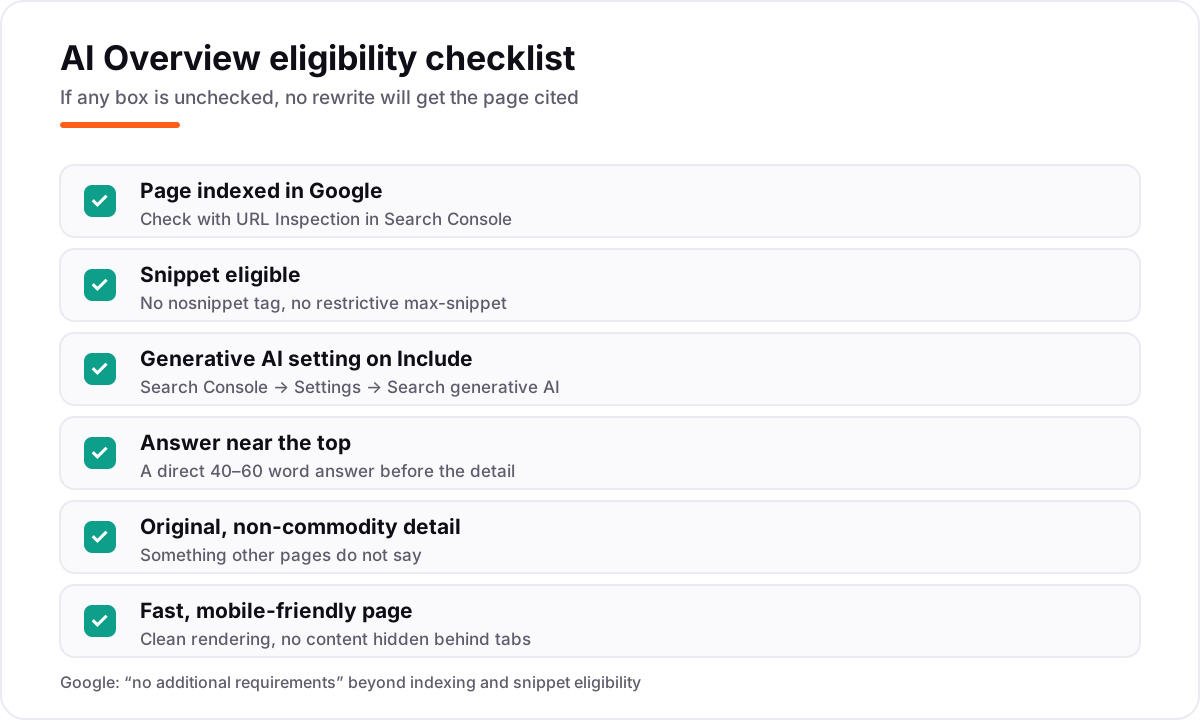
First, the page must be indexed. Check it in Search Console with URL Inspection. If Googlebot cannot crawl the page, it cannot be cited. Second, the page must be eligible to show a snippet. A nosnippet tag, or a restrictive max-snippet value, limits what search can show, and the same limit applies to AI features. Use those tags only on pages you genuinely want to keep out of snippets.
Third, check the Search generative AI control in Search Console, under Settings — rolled out worldwide as of August 31, 2026. The default is Include; on Exclude, your links cannot show in AI Overviews or AI Mode. Someone on your team may have switched it off without telling you.
What you do not need: special schema.org markup for AI Overviews, a new machine-readable file, or any “AI optimisation” plugin. Google has said explicitly that no special schema is needed. Ordinary structured data still helps — our guide to schema markup for small businesses covers which types matter — but it helps because it clarifies what the page is about, not because it unlocks AI features. The same applies to llms.txt: it is a useful file for AI crawlers, as explained in our llms.txt explained guide, but it is not a requirement for appearing in AI Overviews.
One more distinction worth knowing: Google-Extended, the robots.txt token, controls whether your content is used to train Gemini models. It does not affect inclusion in Google Search and is not a ranking factor. Blocking it will not remove you from overviews, and allowing it will not get you in.
Not sure where to start?
Get a free audit - written findings in 2 business days, yours to keep.
Get my free auditQuery fan-out: the idea that changes the work
Before writing an answer, Google runs several related searches at once. It calls this query fan-out. A search for “best dentist near me” might fan out into searches about cost, reviews, opening hours, insurance accepted and children’s dentistry. Each of those smaller searches is another chance to be cited, because the overview is assembled from the results of all of them.
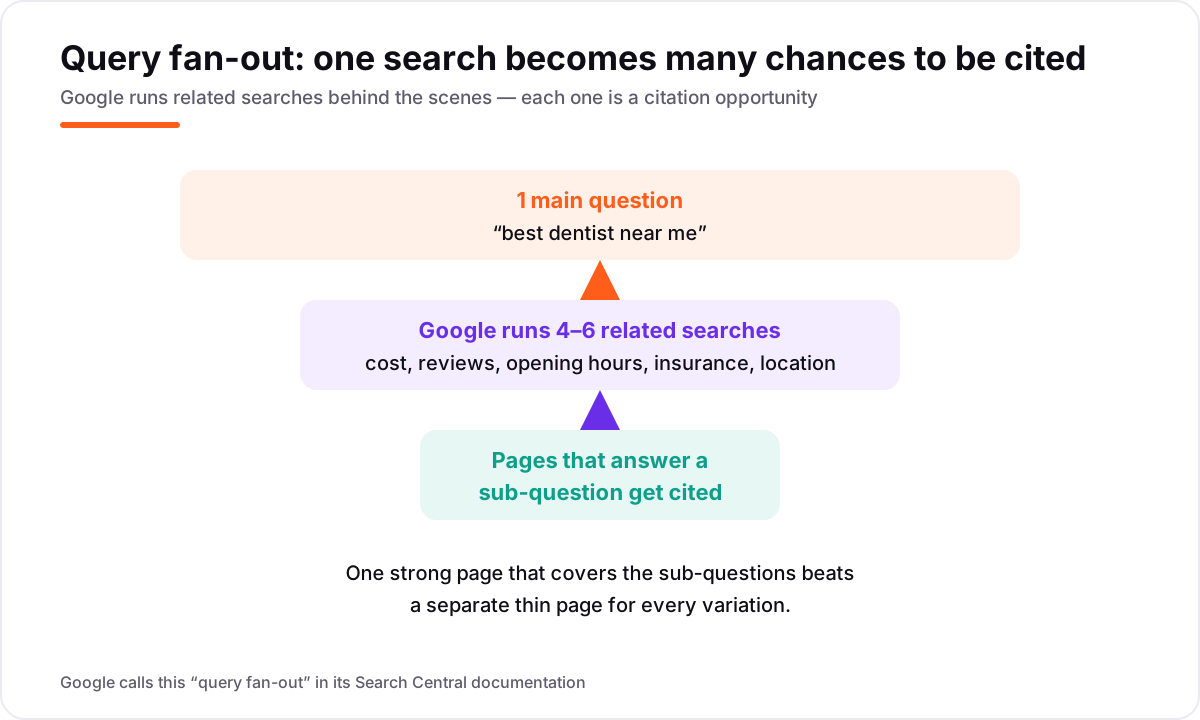
This is why a page can be cited without ranking first for the main query. If your page answers the cost sub-question clearly, it can be the source for that part of the answer even while another site wins the main ranking — in one small September 2026 dataset, 179 of 274 cited links went to pages beyond page one for the main query.
The practical consequence: cover the sub-questions inside one strong page rather than spinning up a thin page for every variation — Google treats large numbers of near-duplicate pages as scaled content abuse. One thorough page gives Google several passages to lift, all from a page that can also rank on its own merits.
How do you find the sub-questions? Search the main query yourself and read the overview, the “People also ask” box and the related searches. Then ask your customers: the questions they ask on the phone are usually the fan-out questions, phrased in plain language. Keep a list of 20 to 40 real buyer questions and work through it steadily — that list becomes your prompt set, and it is the raw material for the workflow below.
The 7-step workflow
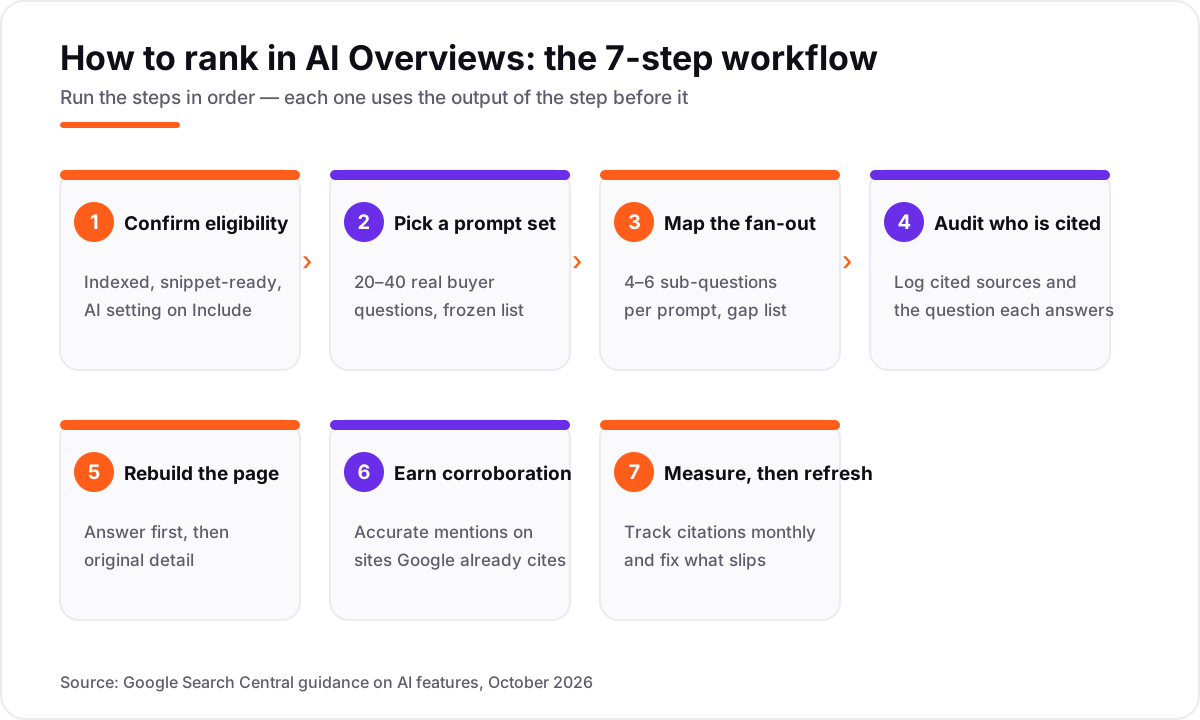
Step 1: Confirm eligibility. Run the checklist from the previous section on the pages you care about. Fix indexing, snippet and Search Console settings first. Nothing else helps a page Google cannot quote.
Step 2: Build a fixed prompt set. Pick 20 to 40 buyer questions and freeze the list. These are the searches you will track, so they should be questions a paying customer actually asks — not keyword variations you invented for volume.
Step 3: Map the fan-out. For each prompt, list 4 to 6 sub-questions and mark each one clear, vague or missing on your current page. The missing ones are your content gaps.
Step 4: Audit who gets cited. Search each prompt, open the overview, and log the cited sources: what kind of page they are, and which sub-question each one answers. You will usually find that the cited pages are not the biggest sites — they are the clearest ones for that specific sub-question.
Step 5: Rebuild the page. Rewrite so the answer comes first and the gaps from step 3 are covered. The next section explains how.
Step 6: Earn corroboration. Get your business described accurately on third-party pages Google already cites — directories, review sites, local media, industry lists. The section after next explains why.
Step 7: Measure, then refresh. Check monthly whether you are cited, and fix what slips. The final section of this guide covers how.
Writing pages Google can quote
Google’s advice centres on unique, non-commodity content — pages that say something other sites do not. A page that restates what ten competitors already say gives Google no reason to cite it over them. A page with your own prices, process, photos and answers to the awkward questions is quotable because it is the only source for those facts.
Put a concise, direct answer near the top of the page — roughly 40 to 60 words that answer the question in plain language, self-contained enough to be lifted verbatim. Then add the detail that proves it.
Freshness helps, though it is not a magic lever. Cited sources skew fresher than standard results, so update statistics, refresh dates quarterly and show a visible “updated” date on pages that carry time-sensitive facts.
And traditional ranking is still the strongest predictor of citation: in the September 2026 dataset, about a third of citations came from page-one results. So the ordinary SEO work comes first — pages that match intent, internal links, and time. Our guide on how long SEO takes to rank sets realistic expectations. Our guide on how to get your brand cited in ChatGPT and AI search covers the same habits for other AI systems; for the bigger picture, see what is AEO.
Earning corroboration off your own site
AI systems trust a claim more when other sites say the same thing. If your page says you are a family dentist in Austin with 15 years of experience, and your profile, directory listings and a local article all say the same, the claim is corroborated. If only your own page says it, it is a claim.
So the off-site work matters: consistent name, address and phone number everywhere; accurate categories and services on your profile; real reviews that mention the services you want to be known for; mentions on sites Google already cites for your kind of query. You cannot control what other sites write, but you can make sure the facts about your business are consistent, current and easy to find — and you can earn mentions by being genuinely useful to local publications and community sites.
This is also where links still do quiet work. A link from a relevant, trustworthy site is a vote that your page is worth citing, and it helps the page rank for the sub-questions in the first place. The effect is indirect, but it is real. If you want the method, our guide on best AI SEO tools in 2026 includes tools that track AI citations, so you can see whether the corroboration work is paying off.
Measuring and refreshing
You cannot improve what you do not watch. Search Console now has dedicated generative AI performance reports — Google announced them in June 2026 and says they rolled out to all websites worldwide as of August 31, 2026. They show which of your pages appear in AI responses, by country. AI Overview and AI Mode traffic is also counted in the overall Performance report, mixed with regular results.
On top of that, keep a manual log: once a month, search your 20 to 40 prompts and note whether an overview appears, whether you are cited, and which competitor pages are cited instead. A rank tracker helps at scale — see our guide to the best rank tracking tools in 2026 — but a spreadsheet and a monthly hour will get a small business most of the way there.
When a citation slips, diagnose before you rewrite: was the page de-indexed, did a competitor publish a clearer answer, did your facts go stale? Refresh the page, tighten the answer passage, and check again next month.
Mistakes that waste time
A few things people spend money on that do not help. Buying “AI Overview optimisation” packages that promise guaranteed citations — Google says no one can guarantee inclusion, and the sellers cannot control the overview. Adding special AI schema or buying an “AI visibility” file — no such requirement exists. Blocking Google-Extended and expecting to disappear from overviews — it controls training data, not search inclusion. And spinning up dozens of thin pages, one per keyword variation — that is scaled content abuse, and it dilutes the strong page you already have.
The other common mistake is the opposite: doing nothing because the overview “steals clicks.” It does take some clicks. But it also puts cited sources at the top of the page, above every competitor. For a business that depends on local search, being the cited source for “how much does a root canal cost in Austin” is worth more than ranking third below a summary that answered the question without you.
If you want help, Serpastra’s AI search work starts with an audit — $349 one-time — that checks eligibility and maps your prompt set. AI search optimisation starts from $600 a month, month to month after 90 days. Book a call and we will tell you plainly where you stand.
Related guides
 AI SearchHow to get your brand cited in ChatGPT and AI searchA practical guide to earning citations in ChatGPT, Perplexity and Google AI Overviews: crawler access, Bing indexing, answer-first pages and brand signals.
 AI SearchWhat is AEO? Answer engine optimization vs SEOWhat answer engine optimization (AEO) is, how it differs from traditional SEO, and the practical steps that help your content get used in AI-generated answers.
 AI SearchBest AI SEO tools in 2026: honest picks by jobBest AI SEO tools in 2026, picked by job: Semrush and Ahrefs for research, Surfer and Clearscope for content, Otterly for AI tracking, with 2026 prices.
Frequently asked questions
Do I need special schema to appear in AI Overviews?
No. Google says there is no special schema.org markup you need to add, and no AI text files or new markup. A page must be indexed and eligible to show a snippet. Ordinary schema that matches the visible page still helps Google understand the page, but it does not unlock AI features.
Can I rank in AI Overviews without ranking on page one?
Yes, it is possible. Because of query fan-out, Google retrieves pages for related sub-searches, so a page can be cited for one part of the answer without ranking first for the main query. You still need to be indexed and to rank for the sub-question it answers.
How do I stop my site appearing in AI Overviews?
Use the Search generative AI control in Search Console, under Settings. The default is Include; switching to Exclude means your links cannot show in AI Overviews or AI Mode. Google says the control is not used as a ranking signal for other parts of Search.
How long does it take to get cited in AI Overviews?
There is no fixed timeline. If the page is already indexed and ranking for related searches, a clear answer passage can be cited within weeks of a rewrite. New pages, or pages in competitive markets, usually need months of ordinary ranking work first.
Does blocking Google-Extended remove me from AI Overviews?
No. Google-Extended controls whether your content is used to train Gemini models. It does not affect inclusion in Google Search and is not a ranking factor, so disabling it will not remove you from overviews.
What is the difference between AI Overviews and AI Mode?
Both cite web pages and both use query fan-out. AI Overviews appear at the top of a normal results page, only when Google judges them additive to classic Search. AI Mode is a separate conversational mode in Search that you choose, with follow-up questions.
Shamim
Founder of Serpastra. A full-stack SEO and digital marketer who spends most days on Local SEO for dental practices, AI search visibility and lead generation. More about Shamim.